Request Account & Personal Data Deletion
Once submitted, your account is deactivated immediately and all associated user data is permanently deleted within 90 days.
Open Menu & Select Deletion
Inside the FirstJob app, tap ☰ Menu → Request Account Deletion, or use the web form below.
Confirm Identity & Submit
Select your deletion reason, confirm permanent erasure, and submit your request.
Account Deleted Within 90 Days
Profile access ends immediately. All Firebase Auth & Supabase data is purged completely within 90 days.
Visual Guide: How to Delete Inside the FirstJob App
Follow these two screens directly inside the FirstJob mobile or web application, or submit your request below if you have already uninstalled the app:
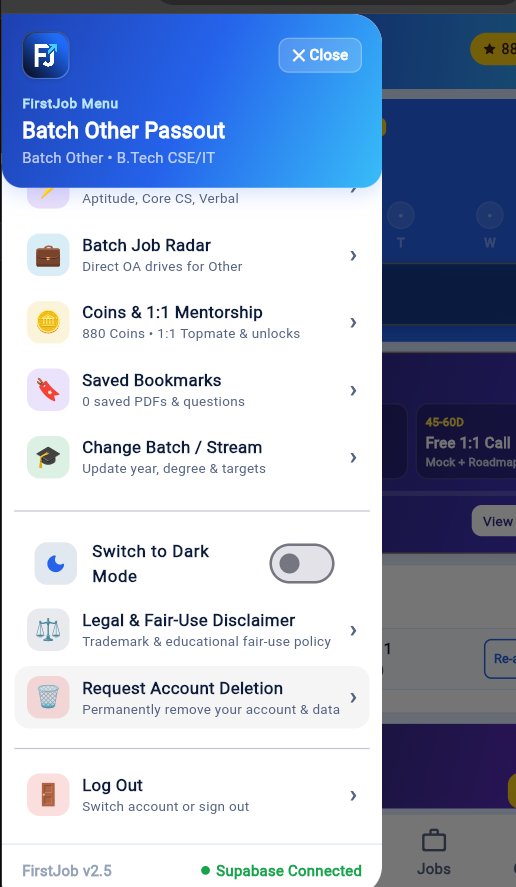
1. Open the side menu (☰) and tap Request Account Deletion
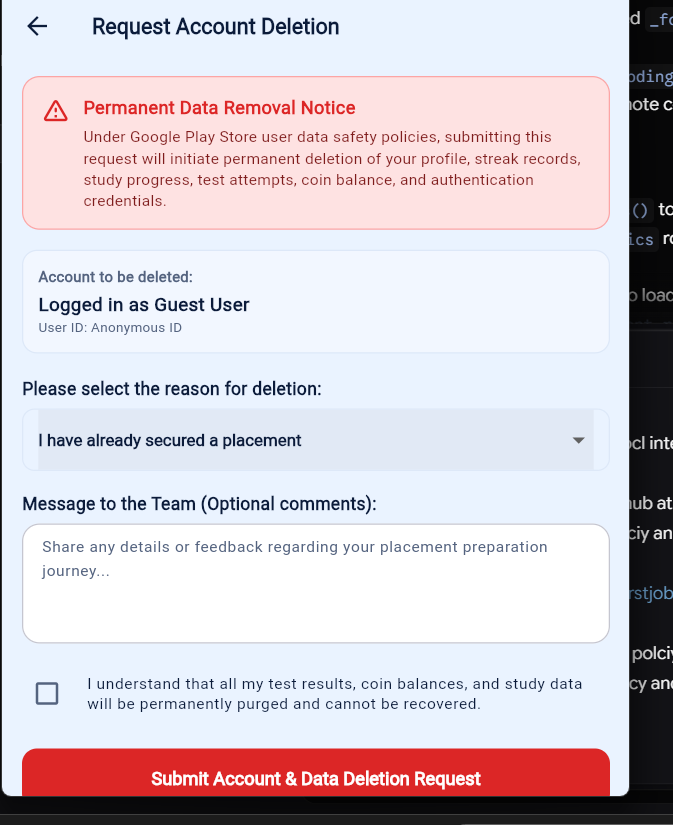
2. Review notice, check confirmation box & tap Submit Account & Data Deletion Request
Data Removed & 90-Day Retention Schedule
| Data Category | Action Taken | Deletion Window |
|---|---|---|
| Firebase Account (`Email`, `UID`, `Display Name`) | Permanently Deleted | Within 90 Days |
| Supabase Profile (`Batch`, `Degree`, `Coins`, `Streak`) | Permanently Deleted | Within 90 Days |
| Quiz Scores, Study Bookmarks & Coin Ledger | Permanently Deleted | Within 90 Days |
| Server Logs & Encrypted Backups | Automatically Expired & Purged | Maximum 90 Days |
Web Deletion Portal (Already Uninstalled the App?)
Need help? Read our Privacy Policy or email support@getyourfirstjob.in.